GA plan — ground floorDrawing A-101 · Revision P04
Less chasing. Less duplication. More project time.
Run the project.
Lose the admin.
Project Book gives architects, clients and contractors the information they need from one shared project record. Update information once, keep everyone aligned and turn the work you already do into an organised, traceable record of the project and the practice.
Early access for UK architectural practices
PROJECT 024
Arbour House
OPEN RFIs052 awaiting response
LATEST ISSUEP04Issued 18 Oct 2026
NEXT VISIT24October · 10:30
Recent project record
View timeline →RFI-005 · Stair balustrade fixingResponse recorded by M. Khan
Brick sample approvedDecision linked to site visit 012
Illustrative interface
Enter it once
Share it automatically
Find it instantly
Project delivery without the duplicate admin
Do the work once.
Let the record do more.
Project administration grows when the same information has to be found, reformatted, emailed, copied into trackers and explained again. Project Book is designed so that an action in the project can update the people, records and practice information that depend on it.
ONE PROJECT UPDATE
Issue a drawing, answer an RFI or record a decision
Architect record
The action, date, author and context are retained without a second filing task.
Client dashboard
Progress and decisions appear in a focused view without preparing another update.
Contractor view
Current information and responses stay connected, reducing follow-up emails and calls.
Practice overview
Tasks, time, activity and project status contribute to the wider picture of the practice.
A Managing the project
Spend less time chasing the latest answer.
- Fewer repeated progress updates
- Less searching through inboxes and folders
- Fewer questions about current drawings
- Decisions already connected to their context
B Managing the practice
Turn live project activity into useful practice information.
- Project status visible without separate reporting
- Tasks, time and deadlines in one working environment
- Less re-keying between project and business systems
- A clearer picture of workload and attention required
The case for better records
Save time first.
Keep the evidence as you go.
Better records should be a result of a better process, not another administrative burden. Project Book helps the team work together more efficiently while creating a clearer, more dependable record in the background.
01
Save time
Update the project once instead of maintaining separate emails, trackers, client reports and contractor records. Find what you need without reconstructing the story across five different places.
- Information entered once
- Updates shared through role-based views
- Less searching, re-keying and reporting
02
Improve compliance
Build structured, traceable records that support your Building Safety Act responsibilities and practical golden-thread habits.
- Consistent record keeping
- Clear information provenance
- Evidence that is easier to retrieve
03
Protect your practice
Keep dated decisions, version history, audit trails and documented instructions together — so the project record speaks clearly when it matters.
- Dated decisions and instructions
- Visible version history
- A dependable audit trail
Project Book supports good information-management practice. It does not replace professional judgement, statutory duties or legal advice, and use of the product does not itself guarantee compliance.
A single project memory
Every record connected.
Every change accounted for.
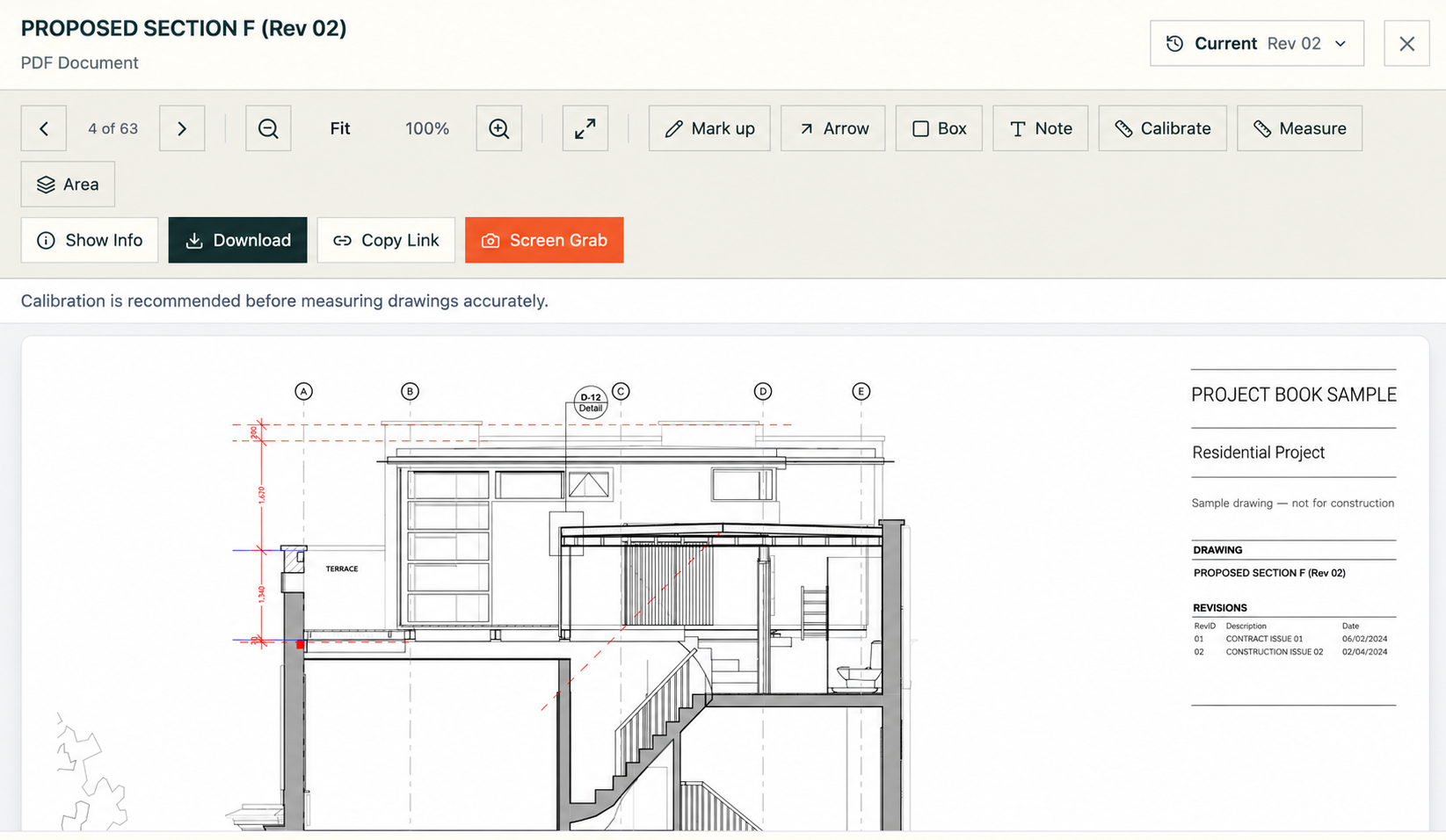
DRAWINGS & REVISIONS
Know exactly which drawing is current.
Open the current issue, review revisions and work with the drawing directly — without searching through downloads and email attachments.
How it works
A simple discipline,
built into the project.
Project Book is designed to fit the way architects already work: capture the record, connect the context and retrieve the story when you need it.
-
01
Capture
Add drawings, messages, RFIs, decisions and site records as the project develops.
-
02
Connect
Keep related records together so the reason, response and outcome remain easy to follow.
-
03
Trace
Use dates, versions and activity history to understand what happened and when.
-
04
Retrieve
Bring the project record back into view — for a meeting, review, handover or dispute.
Made for architectural practice
The moments when a clear record changes everything.
IN THE DESIGN MEETING
“Which option did the client approve?”
Find the dated decision, the option it relates to and the later records that relied on it — without searching old email threads.
BEFORE A SITE VISIT
“What is still outstanding?”
Review open RFIs, recent drawing issues and previous site observations in one connected project view.
IN THE CLIENT DASHBOARD
“What needs the client’s decision?”
Give clients a focused view of progress, pending choices and agreed outcomes without exposing them to the complexity of the full working record.
WHEN THE CONTRACTOR ASKS
“Is this the current information?”
Keep the relevant drawing, RFI response and documented instruction together so the architect and contractor can move the issue forward with less friction.
WHEN THE ACCOUNT IS DISPUTED
“When was that instruction given?”
Return to the dated instruction, related discussion and version history to establish a clearer chronology.
AT PROJECT HANDOVER
“Is the project record complete?”
Bring key information together into an ordered record that is easier to review and pass on.
Early access
Make the project record
part of the architecture.
See how Project Book could help your practice spend less time searching, keep better records and work with greater confidence.